
http://www.boygj.com/
-
#[1]BoyGJ.COM RSS [1] http://www.boygj.com/rss.xml [2]BoyGJ.COM [2]
http://www.boygj.com/ Joomla,WordPress,Template,Graphic,E-Book,Scripts *
[3]Register/Lo...
16 years ago

Dear Friend,
Below are the instructions on how to turn "Labels into Horizontal Tabs," my third hacking attempt. Many thanks for the Exploding Boy website for making it free for everyone to use
Step 0: Label your posts.
Make sure your blog has some posts with label assigned, otherwise nothing will get created. 
Step 1: Downloading and unzipping the file from the Exploding Boy website
Here are the downloading and sample links:
http://www.exploding-boy.com/2005/12/15/free-css-navigation-designs/
http://exploding-boy.com/images/cssmenus/menus.html
Then, have a googlepages account and upload the pics there. Or you could upload the pictures of the tabs to a post of your blog, then you can get the url like this:
Step 2: Changing the Header to become appendable.
Modify this line:
<b:section class="header" id="header" maxwidgets="1" showaddelement="no">
to become
<b:section class="header" id="header" maxwidgets="2" showaddelement="yes">
Step 3: Prepare the CSS portion of the hack.
Copy the CSS code of the tab you like, then changing the picture urls to point to the address of your uploaded pics
For example, if the picture you uploaded to your Blogger post is: <img src="https://blogger.googleusercontent.com/img/b/R29vZ2xl/AVvXsEjtG3GmfAohyKMZTMSe2oZpEIj4M4LFKrIuf-oanC4Wiz_XSU9pPi1CJq_5JzDpE0l3M4LpcH9X6PWlArE9W544l5SRoJbj0pXZooPOCbxGQB7oT8I4fzdkKENmsDFYHZOvkKQqOdG9-jE/s400/tableft.jpg" border="0" alt=""id="BLOGGER_PHOTO_ID_5249568039400111794" />
then the tab would look like this:
#tabs a {
float:left;
background:url("https://blogger.googleusercontent.com/img/b/R29vZ2xl/AVvXsEjtG3GmfAohyKMZTMSe2oZpEIj4M4LFKrIuf-oanC4Wiz_XSU9pPi1CJq_5JzDpE0l3M4LpcH9X6PWlArE9W544l5SRoJbj0pXZooPOCbxGQB7oT8I4fzdkKENmsDFYHZOvkKQqOdG9-jE/s400/tableft.jpg") no-repeat left top;
margin:0;
padding:0 0 0 4px;
text-decoration:none;
}
Step 4: Adding Label Widget
Follow the instructions from this article, especially step B.4. After you've done with inserting the code & save it, go to Page Element option and drag the newly added widget to stay under the Header area (that we fixed so that it would accomodate this new widget.)
<b:widget id='Label10' locked='false' title='' type='Label'>
<b:includable id='main'>
<div id='tabsF'>
<ul>
<li><a expr:href='data:blog.homepageUrl'><span>Home</span></a></li>
<b:loop values='data:labels' var='label'>
<li><a expr:href='data:label.url'><span><data:label.name/></span></a></li>
</b:loop>
</ul>
<!-- <b:include name='quickedit'/> -->
</div>
</b:includable>
</b:widget>
If you use a style other than F, than make sure id='tabsF' reflects the correct tab, such as id='tabsE' for style E. Later, if you like a different design, just cut-and-paste the style's CSS code, then change this id again to reflect the change.
There you have it! Well-designed tabs from professionals (The Exploding Boy website) being integrated into the new Blogger Beta.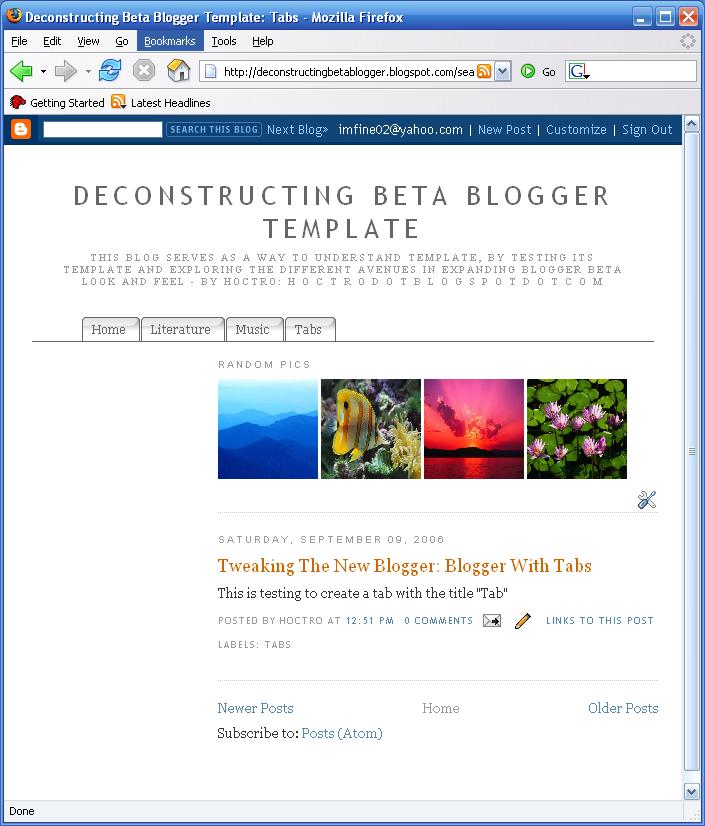
I would like to thank Ramani from Hackosphere for his contructive comments to make this tutorial more readable.
Have a nice day and see you next time,
Cheers,
Hoctro (9/2006)


0 comments:
Post a Comment